COPENHAGEN, Denmark, Feb 24, 2025 – In 2025, at LMT Lab Day, 3Shape will celebrate twenty-five years of innovation by introducing a paradigm shift to CAD workflows for dental labs.
3Shape will soon add a free and fully integrated AI-driven crown design application and various workflow innovations to its 3Shape Dental System 2024 software to enhance efficiency and digitization for dental labs.
“As the very first employee hired at 3Shape 25 years ago, I’ve witnessed CAD/CAM evolve from a bold vision into the industry standard. The rapid adoption of digital workflows by both labs and practices has been remarkable. That’s why lab technicians need to experience the speed, automation, and convenience of our new Dental System 2024 software,” says Rune Fisker, senior vice president of product strategy at 3Shape.
At the LMT Lab Day and the upcoming IDS in Germany, 3Shape will introduce new and innovative upgrades to its 3Shape Dental System software for labs that include integrated and free AI-driven design automation, faster case management, 3Shape LMS software updates and workflow integration, TruAbutment ioConnect partnership, and seamless cloud-based licensing.
Key highlights for 3Shape Dental System 2024:
1. AI Powered Design Proposals – Now Free with 3Shape LabCare*
Labs will receive AI-powered editable design proposals for crowns, inlays, and onlays from 3Shape Automate when opening cases or desktop scanning. The integrated workflow requires no manual setup.
AI design proposals are included free with a 3Shape LabCare subscription to maximize productivity for dental labs.
2. Enhanced efficiency with new Dental System 2024 software
Ensure quicker turnaround times with up to 10x faster case management.
Improve productivity with up to 20x faster reopening of cases.
Free up time with AI-powered automation for routine tasks such as occlusal plane positioning, segmentation, and annotation placement.
Eliminate common design issues with Automated scan alignment and correction tools.
Streamline design processes and reduce manual adjustments post-production with new sculpt tools for RPD teeth.
3. New integrations for 3Shape LMS
3Shape LMS and Dental System are now integrated to streamline tasks, reducing admin work and double data entry between the two solutions. **
3Shape LMS delivers true digital customer experience – 3Shape LMS integration with 3Shape Unite Cloud for dental practices enables labs to collaborate and communicate with their clients via the cloud. The integration additionally provides the lab’s clients with a transparent overview of their cases 24/7.***
4. TRIOS ioConnect Workflow for All-on-X Treatments
Labs can take advantage of 3Shape’s TRIOS ioConnect Workflow for All-on-X full arch restoration cases. This collaboration integrates the power of TruAbutment’s ioConnect elongated abutments with 3Shape’s Dental System software and TRIOS intraoral scanners, providing dental labs with an effective solution for designing All-on-X treatments.****
3Shape will soon release a Straumann TRIOS workflow with Straumann’s new exact scan bodies for full-arch digital workflow cases.
5. Cloud Licensing: Freedom from Physical Dongles
3Shape is eliminating its physical software license dongles and moving to a cloud-based licensing system instead. The cloud license will connect to the 3Shape Account and provide labs with an overview of all their purchased software.
The software license on the cloud will simplify software updating and ensure labs always benefit from the latest functionality and improvements.
Experience the Future of Digital Dentistry
Dental System 2024 introduces new AI-driven tools, automation, and integrations to improve speed and efficiency in dental labs. With AI-driven processes and intelligent integrations, the latest release allows dental lab professionals to concentrate on providing exceptional service to their clients.
*First available in select countries from April 2025. Available only to 3Shape LabCare subscribers on Dental System 24.1.1 or newer. Fair use limit applies. If the limit is exceeded, additional AI designs can be purchased using CAD points. AI design proposals are only available for TRIOS, integrated 3rd party IOS, and 3Shape desktop scans.
**Planned rollout: March 2025. This integration follows the global availability of 3Shape LMS, which is currently supported in English-speaking countries, including the United States, Canada, United Kingdom, Denmark, Sweden, Norway, Finland, Belgium, Netherlands, and Luxembourg.
*** Available Q2 2025
**** Available March 2025
Source: 3Shape
About 3Shape
Founded in 2000, 3Shape develops 3D scanners and CAD/CAM software solutions, primarily serving the dental and audio industries. Headquartered in Copenhagen, Denmark, the company offers a range of products, including intraoral scanners, lab scanners, and comprehensive CAD/CAM software suites designed to enhance diagnostic and treatment workflows for dental professionals. Over its two-decade history, 3Shape has expanded its global presence, employing over 2,200 professionals and operating in more than 100 countries. In 2023, the company reported revenue of approximately $750 million. 3Shape’s commitment to innovation and quality has established it as a trusted partner for dental and audio professionals worldwide.
Concepts NREC Business Development Director Dave Pincince speaks to Army, Navy, Air Force, NASA, DARPA, DOE, and FAA engineers, manufacturers, and suppliers at a forum on advancements in turbine engine technology. Image: Concepts NREC
WHITE RIVER JUNCTION, VT, Feb 18, 2025 – Concepts NREC announced that it has been named one of the Best Places to Work in Vermont 2025 through an assessment managed by Workforce Research Group and sponsored by VermontBiz and the Vermont Chamber of Commerce.
The annual assessment surveys employee satisfaction and scores each company’s workplace policies, business philosophy, employee culture, and best employer practices.
The award highlights Concepts NREC’s dedication to fostering a workplace that values and supports its employees. Concepts NREC has developed an environment that focuses on employee well-being and professional development by offering competitive benefits and promoting teamwork.
“We are incredibly honored to be recognized again as one of the Best Places to Work in Vermont,” said Sean McDermott, CEO. “This award reinforces our belief that a positive work environment is essential for driving innovation. We are immensely proud of our team and grateful for their dedication to our clients’ success.” As a provider of turbomachinery engineering solutions worldwide, Concepts NREC is committed to attracting and retaining exceptional talent. The recognition as one of the Best Places to Work underscores its position as a valued employer in the industry.
Source: Concepts NREC
About Concepts NREC
Established in 1956, Concepts NREC provides turbomachinery design, development, testing, manufacturing, and software solutions. Headquartered in White River Junction, VT, the company offers a comprehensive suite of services, including engineering design, Computer-Aided Engineering (CAE) and Computer-Aided Manufacturing (CAM) software, precision manufacturing, and educational training. Concepts NREC has developed the Agile Engineering Design System, an integrated software suite covering the entire turbomachinery design process, serving industries such as aerospace, automotive, energy, industrial processing, medicine, and transportation. The company employs approximately 163 professionals and has been recognized among the Best Places to Work in Vermont for 2025.
Designing a part is half the job. The other half is making it. Onshape by PTC, the only professional cloud-based CAD program, is now able to do the whole job, start with design and end with manufacturing, with its recently announced Onshape CAM Studio. (It’s officially a beta version, but as a demo is about to show, quite usable.)
Like most CAM programs, CAM Studio generates tool paths and shows animations of tools cutting away material. Unlike most CAM programs, it operates seamlessly within Onshape, and being cloud-based brings to CAM the advantages Onshape users have long enjoyed with their CAD program.
CAM Studio is integrated into Onshape as well as any CAM program has ever been integrated into a CAD program. Moving from CAD to CAM is seamless. Onshape users should have no trouble easing into the machine shop experience — though a background in machining operations, CNC machines, cutting tools, speeds and feeds, etc., would help.
CAM Studio is what Onshape calls “full cloud.” Like the Onshape program, CAM Studio runs on the cloud and stores data on the cloud. Everything but the display happens on the cloud. Being full cloud bestows upon CAM Studio the same cloud powers as it did upon the Onshape program. Such as built-in PDM. Non-CAM data is stored along with CAM data, something ordinary CAM programs need a PDM program for. And all data, CAM or otherwise, is stored on the cloud continuously and without effort. You’ll never again have that sinking feeling when the lights flicker, that all is lost (at least all your work since your last Save command — was it yesterday?). CAM Studio, like Onshape, has no Save command. You don’t need it. You won’t miss it. Your stuff is saved continually.
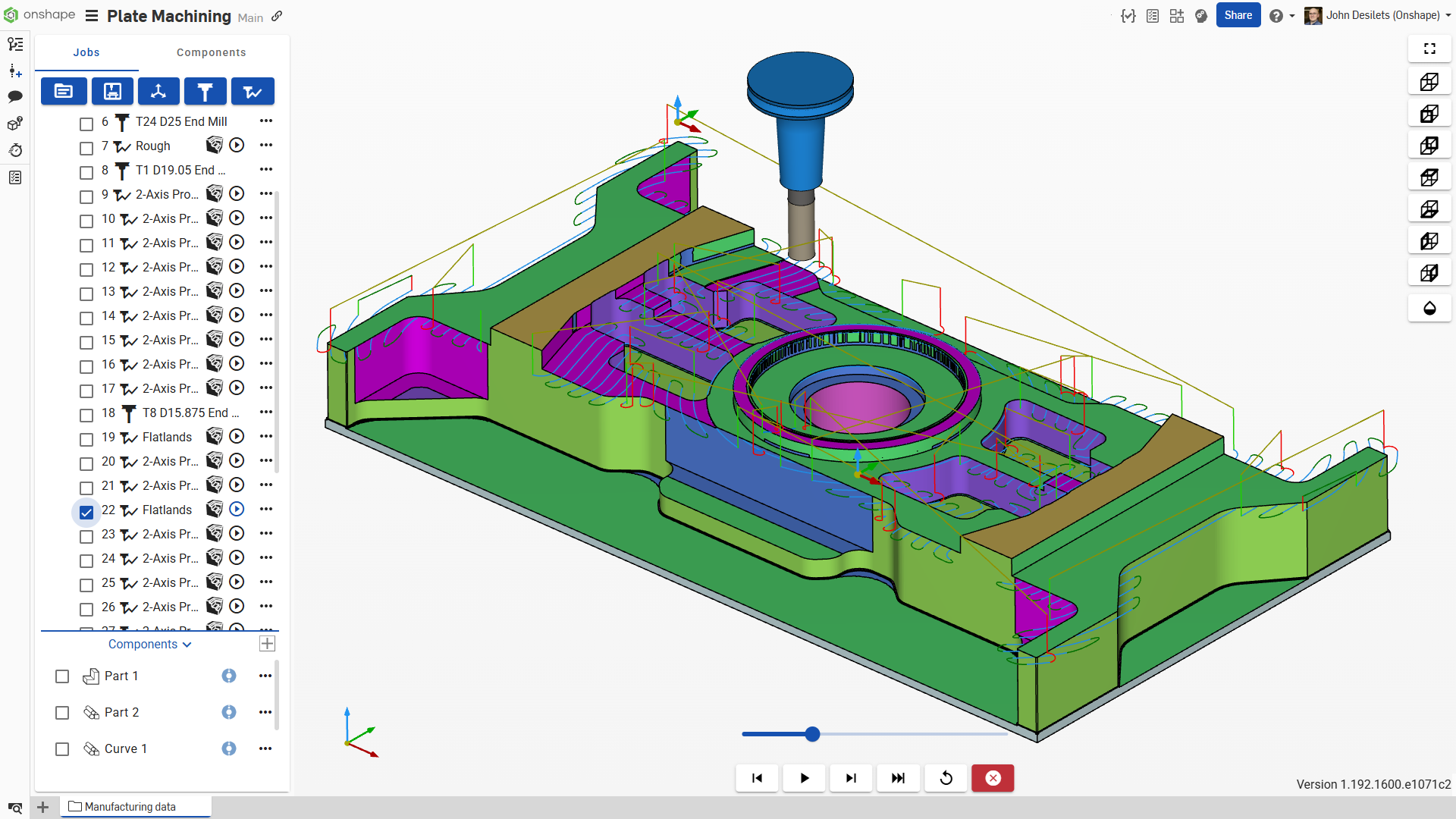
An Onshape part with toolpaths made by CAM Studio. Image: Onshape
Even more impressive is cloud computing, which gives you access to practically unlimited computing resources. The previous generation of CAD, CAM and CAE programs may have required behemoth workstations at your side, but modern applications, namely Onshape and CAM Studio, don’t need them. Instead, you are tapping into data centers with row after row of servers crammed with GPUs in massive data centers. Such is the cloud. The scale of computing offered the ordinary CAD, CAM or CAE user defies comprehension. You can think of your computer as a terminal to a super-computer and you will have an idea of the power you hold no matter what you are holding. You can be holding a Chromebook or sitting at a workstation. Processes that can be parallelized, such as tool paths and simulation, can occur simultaneously instead of sequentially.
What Can CAM Studio Beta Do Today?
CAM Studio is being introduced with a bevy of post processors for CAM machines plus generic post processors. More are in the works. Users not finding their particular CAM machines in the CAM Studio machine tool library are encouraged to suggest them in the application’s Help. Onshape plans to offer a make-your-own post-processor facility in the future.
Onshape is updated frequently. With the update happening to the Onshape program on the cloud, new features and machine tools will be available to users just by logging in. Just as with Onshape, CAM Studio users will never have to wait for a local version of their program to be updated — for there is no local version. Onshape is updated (on the server) every 3 weeks, and it is presumed that CAM Studio will be as well.
Cody Armstrong, Senior Director of Technical Services, Onshape
We are introduced to Cody Armstrong, Senior Director of Technical Services. Cody runs all of Onshape’s pre-and post-sales technical teams in North America and is a familiar face for Onshape users who tune into the company’s What’s New demonstrations.
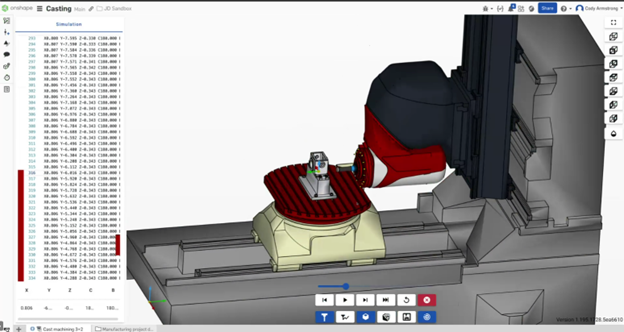
Cody starts with a part from an assembly. CAM Studio is unusual in letting you machine parts and assemblies. This lets you visualize machine fixtures, jigs and even the cutting machines themselves as they produce parts. We will see a CNC machine in 3D, its cutting head spinning, its table moving.
The CNC machine could be a water-jet cutter, included in the machine tool library.
CAM Studio currently supports 2.5-axis and basic 3-axis machining, with more advanced capabilities, like 5-axis, on the horizon.
Built on Cloud, Built for Machining
Cody seems to know his way around a CNC — a bit of a surprise given Onshape’s previous focus on design.
“There’s many of us with machine-shop experience,” says Cody. Darren Henry, senior VP of operations at Onshape, once operated an Acme screw thread machine.
Cody reiterates how the cloud that gave Onshape its advantages over land-based CAD programs also gives CAM Studio advantages over land-based CAM:
CAM Studio has PDM built in. Parts are tracked just like in a PDM but without having to learn PDM or having to do anything special.
Instant and easy collaboration.
What does PDM in CAM even mean? Manufacturing has data to manage, just as CAD does. With CAM, that data is tool paths, G-code, interim machining shapes (more on that later), machine setups, etc. Storing all that data alongside the machined part is unique to CAM Studio and makes the management of manufacturing data a breeze. You don’t have to think about part and data management. It just happens.
Collaboration, a capability that land-based CAD and CAM vendors have had to create and try to insert into their programs, is built into Onshape and CAM Studio. Designers and engineers (those not using Onshape) still communicate their designs with PowerPoints filled with screenshots and cluttered with markups. They go back and forth with emails with PDFs attached. All the time, they hope they are on the same page, i.e., the exact version of the design. All Onshape users have to do is share a URL. The URL links to the latest design. It’s not a copy, not a screenshot, not a PDF, but (cue heavenly music here) the one and only single source of truth. It’s live. It’s the actual 3D model of the right part or assembly. Onshape never have to worry about whether they are looking at an old version.
How Does It Work?
Cody dives into CAM Studio to show how an Onshape customer would use it.
Say you have created an assembly and are ready to machine a part. You create a new CAM Studio tab. It’s similar to how you would use Render Studio; it’s a new tab within the document. You define what you want to machine, and you add that component. Then, you machine the part going from left to right in the CAM Studio user interface.
First, you create a new job and define a body, work holding or define stock. If you are machining a cast part, the cast shape is the stock. For now, let’s keep it simple and start with a block of stock material. Next, you’ll select a machine from a machine tool library. The list of machines also includes several generic post processors, like one supporting a Fanuc controller (a common industry standard).
After you pick a post-processor, you can define work offset, define stock definition and so on. For the demo, we will choose a stock box point for my stock definition and a corner of the part to define my work offset.
Now to pick a cutting tool. CAM Studio includes a robust tool library. Here, we can grab a flat-end mill. Notice that the tool includes the arbor and the holder. That will become important when we go to simulation.
Now to generate the tool paths. That can be done a number of different ways. You can select the whole path or select edges and faces. Since we are initially doing a roughing operation, it’s easy to do all the paths at once. Just hit OK, and CAM Studio will generate all the tool paths.
The next thing we see is the hundred (or so) tool paths.
If you blinked, you missed it. It’s practically that fast. So fast, we wonder if it is live or pre-recorded. (It’s live.)
What Just Happened?
We must pause to consider the significance of what just occurred. The time to generate tool paths used to be time to get a coffee. A hundred tool paths could be lunch. Instead, we have generated a hundred (or so) tool paths on the fly.
How? CAM Studio is heavily multi-threaded, says Cody. Toolpaths can be separately assigned, each to a single processor, just like FEA, CFD and rendering programs do. A hundred tool paths can be calculated, at least theoretically, at the same time as one.
“Before this, you were bound by the number of cores on your CPU,” says Cody. “Now, you can use a hundred GPUs on the cloud.”
Are a hundred tool paths common, or is this an exaggeration? Cody sticks to his story.
“A very complicated part being machined could have multiple operations coming from different directions, with potential for five, six setups for the part and each setup has 20 toolpaths, then you can get into the hundreds,’ he says. “That may be extreme in 2.5-axis. With increased complexity, say a part being milled on a 3-axis machine, you can have hundreds, even a thousand tool paths.”
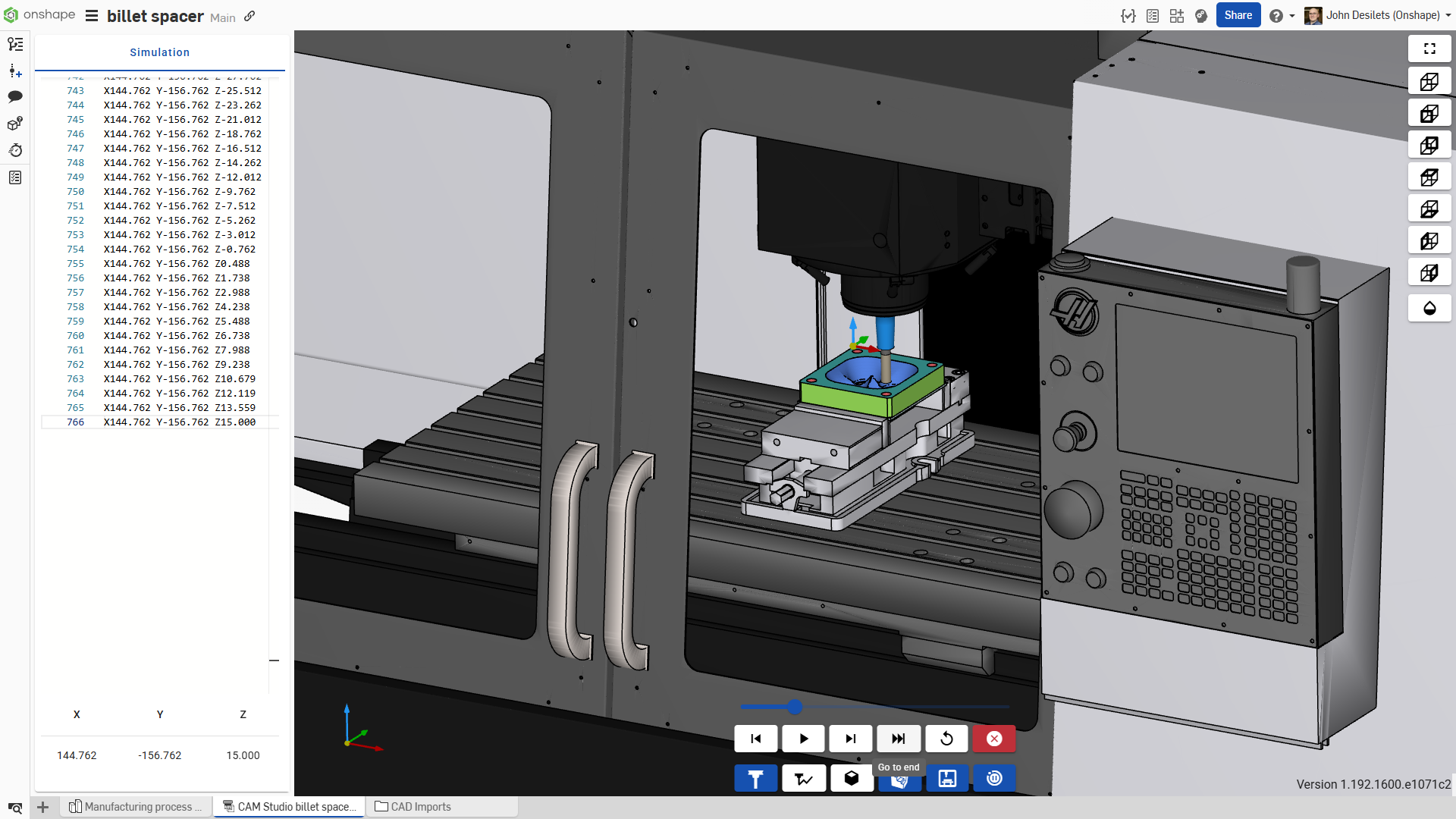
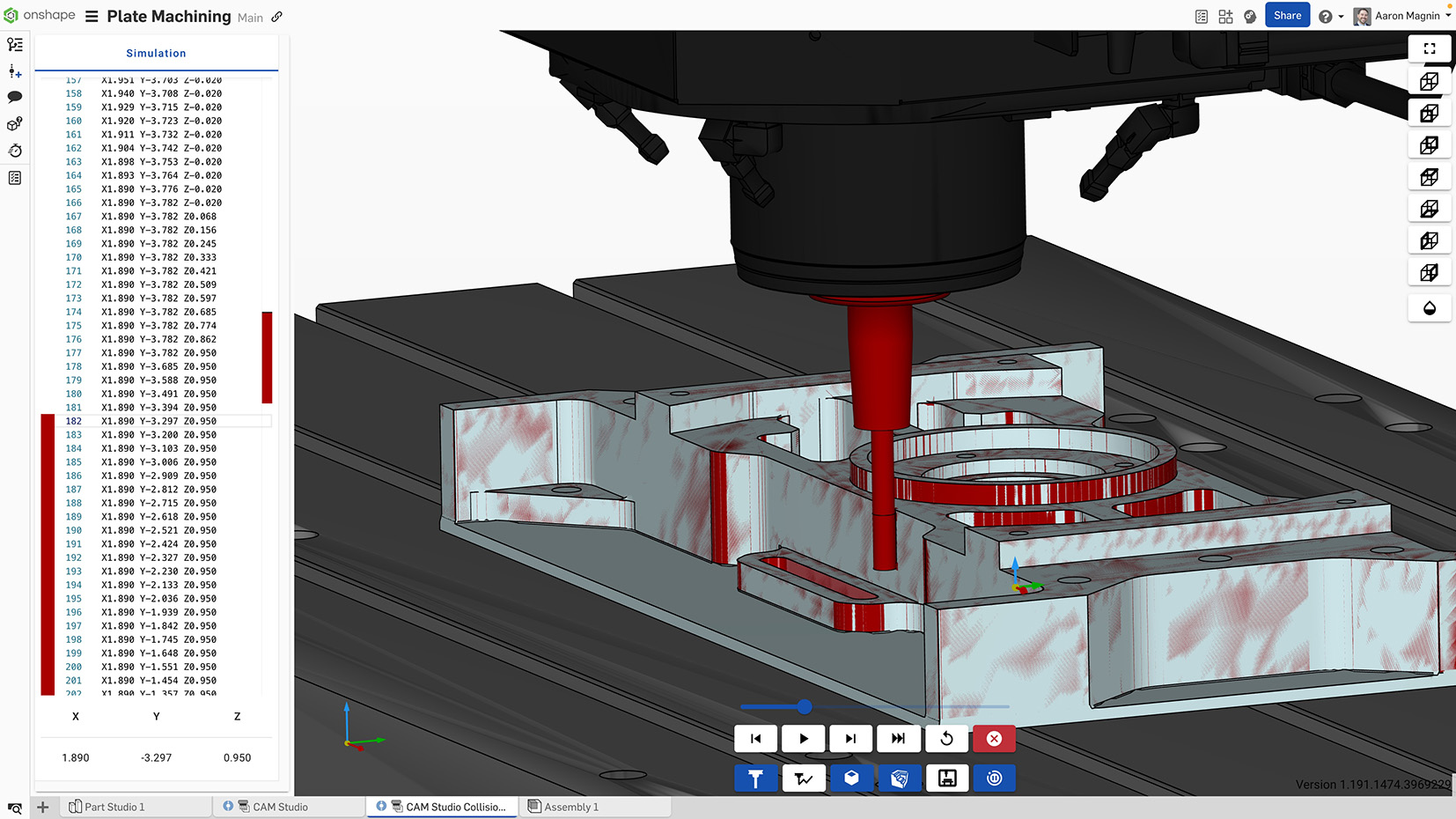
CAM Studio’s full machine kinematics mode shows part, fixtures and cutting machine. Image: Onshape.
Show Me (Machine Tool Simulation)
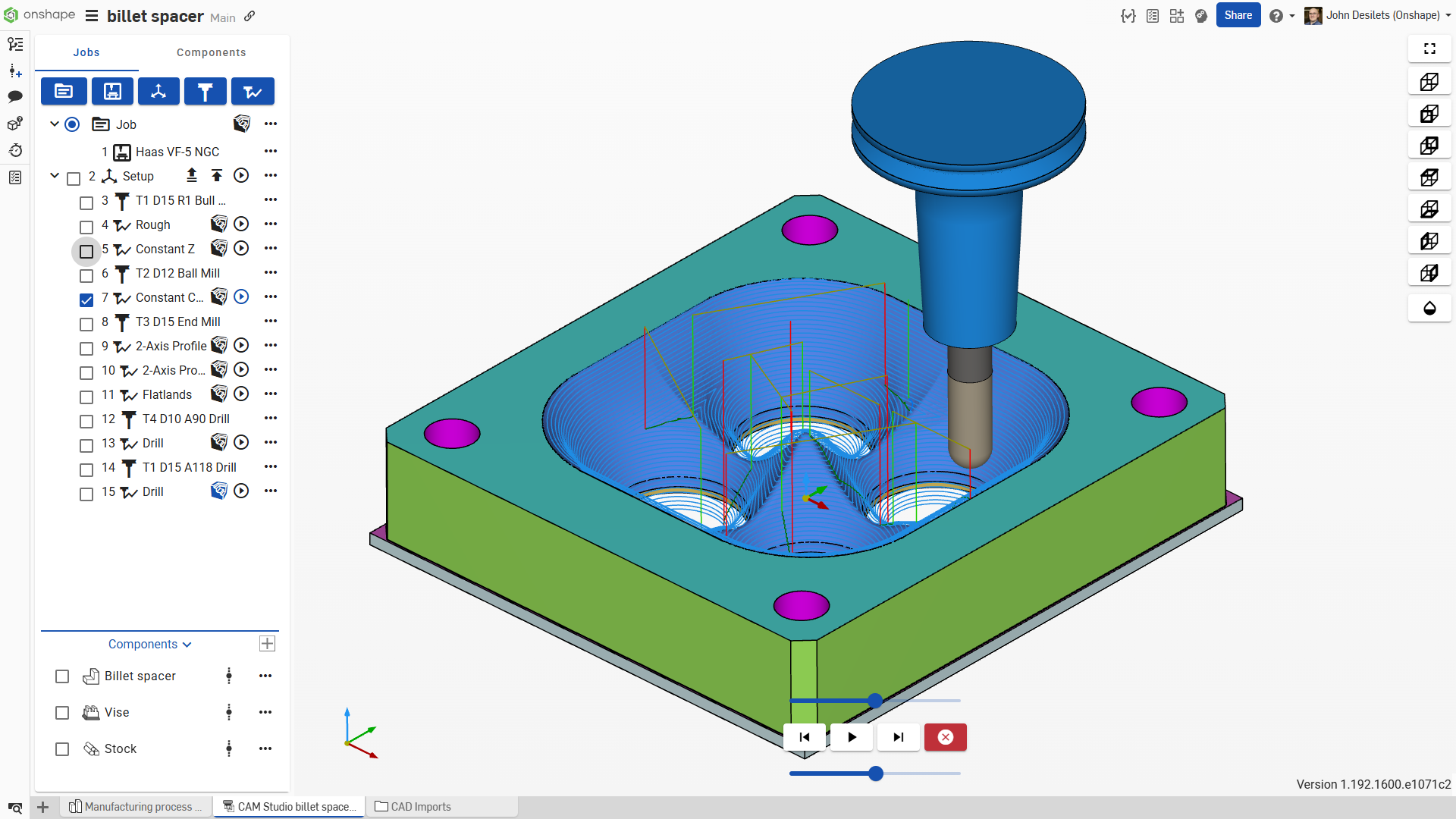
You can elect to have CAM Studio show the tool moving along the paths with the stock removal. Without (Backplot option) is quicker, but honestly, showing the machine tool paths with stock removal is way more fun to watch — and can actually be informative.
Simulation is what CAM guys call the animation, in this case, 3D animation, of the cutting tool removing material.
I may have seen such simulations a hundred times, yet I’m hypnotized. The flat-end mill furrows through the block in parallel rows, removing material. It’s like mowing the lawn — if your lawnmower could cut perfectly parallel rows and adjust cutting height on the fly.
With stock removal turned on (Verify mode), machinists can make educated guesses as to whether the cutting tool will gouge or plunge as it should.
I dream of a physics-based simulation that accounts for the strength of materials, kinetic energy, temperature, friction, non-linear deformation, and tool wear… to give a more realistic simulation.
I awaken to hear that CAM Studio automatically generates a model of the part after each machining operation. For example, the shape after after the roughing operation is saved. Automatically. You didn’t have to remember to export the intermediate shape for the record as you would have had to do with other CAM programs. You don’t have to take screenshots — CAM Studio has saved the whole model.
The intermediate shapes are saved in the background. They are like breadcrumbs. Use them to retrace the steps — or add more steps. Suppose you wanted to do a final 3-axis finish on the part with a small diameter ball end mill. Ordinary CAM programs may have you start from the original rectangular stock material. With CAM Studio, you can access the intermediate shapes easily by clicking a button and pick up the machining from there.
Show Me the Machine
“One more thing,” says Cody. “We include full machine kinematics.”
Showing the CNC in the animation is always welcome; showing it in a browser is unique.
Hey, that’s what the cloud and “infinite computing” can do; we are learning.
But what purpose does animating the table on a cutting machine actually serve? Beyond being fascinating.
Cody patiently explains the value of full-machine kinematics.
“Suppose your tool path has your cutter colliding with a fixture or the machine. You are going to want to see that before it happens,” says Cody.
Indeed, tool collisions have a way of disrupting your manufacturing operation. The worst case is you have wrecked your expensive CNC machine.
Red is bad. Collision colors are colliding parts in red, and motion stops.
But a tool collision in simulation — before production — will still have you seeing red only on the screen. With CAM Studio’s full-machine kinematics, all colliding parts, whether they are the work, the fixtures or parts of the machine itself, light up in red. And everything freezes. As it might in real life. Except with CAM Studio, you may have averted a disaster. You don’t have to hang up your shop apron and wonder if you still have a job. You have options. You can continue with the animation like a collision never happened (don’t), or you can have CAM Studio avoid the collision altogether.
Other CAM programs may offer full-machine kinematics as an extra-cost option, adds Cody, concluding the demo.
Conclusion
CAM Studio should be a welcome addition for Onshape users, letting them complete the journey from design to manufacturing — so long as the manufacturing is of the 2.5-axis and basic 3-axis type. CAM Studio Advanced, coming next, will support advanced 3-axis, along with positional and simultaneous 4- and 5-axis machining. CAM Studio makes the transition from design to manufacturing seamless. You don’t have to export your CAD model to a CAM program. CAM Studio works off the same Onshape model CAD users have access to. Because it is fully cloud-based, users can rest assured they have the latest version of the model. CAM Studio users will enjoy the same cloud benefits as Onshape users: built-in data management, effortless collaboration, power as needed (particularly useful in generating and animating toolpaths) and my favorite: never again losing work when the power goes out. What a relief that is!
_____________________________________
This article sponsored by Onshape. See how you can sponsor an article on our Sponsorship page.
BOSTON, MA, Feb 12, 2025 – PTC has announced the launch of Onshape CAM Studio Beta, which integrates CAD, CAM and product data management (PDM) to give design and manufacturing teams the opportunity to plan, simulate, and collaborate on machining processes.
This release offers a complete design-to-manufacturing solution, enhancing productivity and creating new opportunities for leading manufacturing brands across the globe.
“With the release of CAM Studio directly into Onshape’s cloud-native platform, users gain built-in version control and centralized storage for their manufacturing strategies,” commented David Katzman, general manager of Onshape and Arena at PTC.
“This ensures seamless collaboration, eliminates the risks of file-based workflows, and provides unmatched traceability throughout the design-to-manufacturing process. CAM Studio reinforces our commitment to empowering teams with tools that enhance productivity and drive innovation.”
CAM Studio supports 2.5 and basic 3-axis machining, with the common manufacturing strategies and machines. For users with advanced manufacturing needs, CAM Studio advanced will offer enhanced capabilities, including advanced 3, 4 and 5-axis machining strategies.
Other features and benefits of Onshape CAM Studio include:
Access to the latest manufacturing information faster, while utilizing Onshape’s built-in PDM functionality for G-code and tooling strategies
Streamlined communication and easy sharing between CAD designers and manufacturing engineers
All stakeholders work from a single source of truth, saving time and money while also reducing manufacturing errors
No additional software installations, licensing costs or administrative costs
Cloud-native accessibility anytime, anywhere
CAM Studio is available to Onshape users who are subscribed to the Professional and Enterprise plans.
Source: PTC
About PTC
PTC Inc., founded in 1985 and headquartered in Boston, MA, is a software company specializing in product lifecycle management (PLM), CAD, augmented reality (AR), and Internet of Things (IoT) solutions. Serving industries such as aerospace, automotive, electronics, and industrial equipment, PTC’s technologies are utilized by 95% of Fortune 500 discrete manufacturing companies. As of September 30, 2024, PTC Inc. supports more than 30,000 customers globally. As of February 10, 2025, the company has a market capitalization of $20.3 billion. PTC employs around 7,500 people globally.
LIMASSOL, Cyprus, Feb 7, 2025 – ENCY Software has announced the release of update 1.0.5 for ENCY and ENCY Robot. The update brings many new features for ENCY users, with a focus on enhancing additive manufacturing operations.
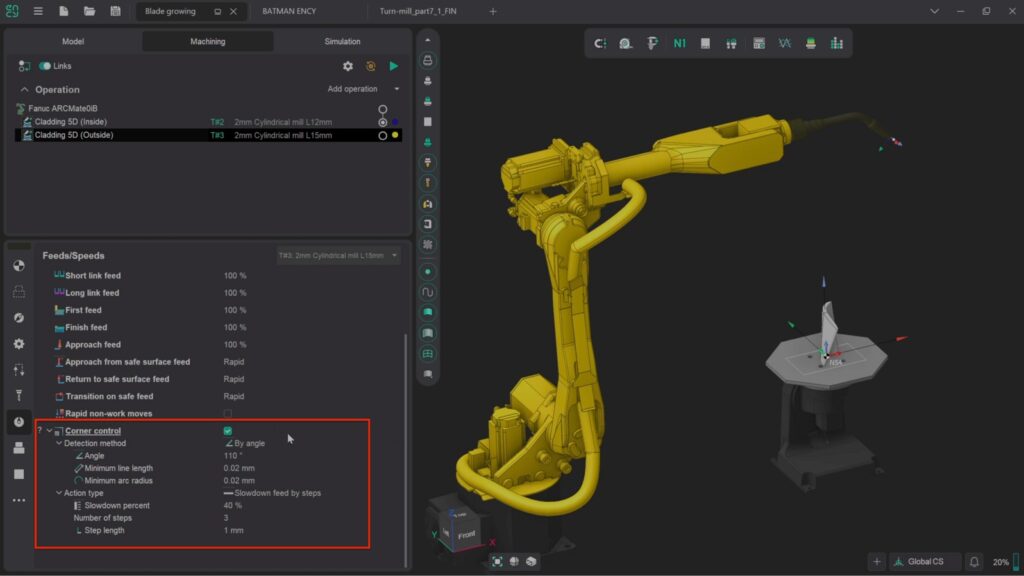
Feed Control in Corners for Additive Manufacturing operations
With the addition of the new corner feed feature, users can exercise absolute control over extrusion or deposition rates throughout the entire path of the operation, minimizing material wastage and optimizing efficiency. Not only does this mean that less material is used, but also less finishing work will be required, leading to a faster, cleaner and precise product.
Other Improvements
Updated tooltips for the approaches/retracts parameter group.
Updated tooltips for the chamfering operation.
Added visualization of the workpiece attached to the robot’s 6th axis for painting operations when the guide curve vector changes in the job assignment.
Added the ability to remove holes from surfaces in the 3D model simplifier for MachineMaker.
Included tool overhang parameters in the machining report window.
Enabled manual sorting to define the machining sequence in the chamfering.
Enabled manual sorting for defining the machining sequence in the Cladding 5D operation.
Added parameters for extending or trimming toolpaths in the Swarf operation.
Significantly improved toolpath calculation algorithms for the 5D roughing operation.
Updated the menu for creating new projects in the current tab in ENCY Tuner.
Added a Tool Direction parameter for outputting to the NC program (Fanuc) for mill-turn machines with a rotary head.
Bug Fixes
In addition to new features, update 1.0.5 comes with many fixes that address known issues, ensuring a stable and smooth user experience.
The improvements strengthen ENCY’s commitment to providing high-performance solutions that address the changing needs of CAD/CAM and offline programming (OLP) users in various industries.
About ENCY
ENCY is a CAD/CAM/OLP software ecosystem designed to transform engineering and manufacturing workflows. Built on the proprietary ENCY X platform, it offers power, security, rich digital manufacturing content, robust API tools, and collaboration capabilities for engineers. The product suite includes ENCY for advanced CAD/CAM operations, ENCY Robot for comprehensive offline robot programming, ENCY Tuner for shop-floor NC-code simulation, and ENCY Clouds for cloud-based digital workspaces. The solutions cater to a wide array of industries, including architecture, arts, automotive, aerospace, consumer products, education, electronics, energy, entertainment, heavy equipment, industrial machinery, medical, shipbuilding, and woodworking. Headquartered in Limassol, Cyprus, ENCY Software Ltd. has been in business since at least 2024.
TOLLAND, CT, Feb 4, 2025 – Sandvik announces the acquisition of MCAM Northwest, ShopWare, and the CAD/CAM solutions business line from OptiPro Systems. These acquisitions represent key steps in Mastercam’s effort to lead advancements in manufacturing.
For over 30 years, MCAM Northwest, has been serving customers in Oregon, Southern Washington, Idaho, Alaska, and Hawaii. ShopWare has been a trusted partner in Illinois, Indiana, Iowa, Kentucky, and Wisconsin, while the CAD/CAM solutions business line from OptiPro Systems, along with its holding company Brightside 09, Inc., has been instrumental in delivering best-in-class solutions to manufacturers in New York.
“Welcoming MCAM Northwest, ShopWare, and OptiPro Systems into the Mastercam team strengthens our commitment to providing manufacturers with top-tier support and industry-leading CAD/CAM solutions,” said Russ Bukowski, interim president, Mastercam. “These acquisitions enable us to forge even closer relationships with our customers across these regions, ensuring their success in a dynamic manufacturing landscape.”
Driving Innovation Through Growth
Mastercam grows by focusing on internal development and planned acquisitions. By bringing in the expertise and advantages of MCAM Northwest, ShopWare, and OptiPro Systems, Mastercam strengthens its network with skilled professionals, better tools, and expanded knowledge to drive advancements. The acquisitions highlight Mastercam’s commitment to improving its channel partners and customers by providing steadfast service, better training, and enhanced support resources.
About Sandvik Group
Sandvik Group, established in 1862 and headquartered in Stockholm, Sweden, is a global high-tech engineering company specializing in solutions that improve productivity, profitability, and sustainability across the manufacturing, mining, and infrastructure industries. The company operates through three main business areas, Sandvik Mining and Rock Solutions, Sandvik Rock Processing Solutions, and Sandvik Manufacturing and Machining Solutions. Their offerings include equipment and tools for metal cutting, mining, and rock excavation, as well as advanced stainless steel and special alloys. As of 2024, Sandvik employs approximately 41,000 individuals and reported revenues of around 123 billion SEK.
About Mastercam
Mastercam is a leading computer-aided design and manufacturing (CAD/CAM) software solution headquartered in Tolland, CT. Founded in 1983, the company has over 40 years of experience in providing advanced software tools for designers and NC programmers across various industries, including aerospace, automotive, and consumer products. Mastercam offers a comprehensive suite of applications such as 2- through 5-axis milling, turning, wire EDM, router programming, plasma cutting, laser cutting, and 3D design and drafting. As of 2024, the company employs approximately 500 individuals. Mastercam is recognized as one of the most widely used CAM software packages worldwide, with over 250,000 installations.
TOLLAND, CT, Jan 21, 2025 – Mastercam has announced three new leadership appointments that will strengthen its ability to deliver innovation, new products, and customer-focused solutions to meet the rising demands of the U.S. manufacturing industry, including high costs, policy shifts, and labor shortages. Mastercam has appointed a new chief innovation officer, a vice president (VP) of product management, and a VP of customer success and program delivery.
Nand Shivkumar is the new chief innovation officer (CIO). In this role, Shivkumar will oversee Mastercam’s product vision and strategy, ensuring the company meets market demands and drives innovation forward.
Nand Shivkumar
“Nand’s appointment marks a significant milestone in Mastercam’s journey toward delivering next-generation manufacturing solutions. His leadership will help us strengthen customer engagement, expand into new markets, and provide even greater value to our customers worldwide,” said Russ Bukowski, interim president of Mastercam.
Shivkumar has over 20 years of experience in software engineering, product strategy, and leading technology innovation. His expertise in scaling SaaS platforms, leveraging AI and machine learning, and leading diverse global teams will play a key role in shaping Mastercam’s future.
Ivan Krstic has been appointed as the new VP of product management.Krstic has over 20 years of experience in product management, with a focus on CAD/CAM and manufacturing technology.
Ivan Krstic
In this position, he will lead product strategy for Mastercam. He will guide the development of the product roadmap for current and future solutions to increase revenue and deliver integrated tools that improve the customer experience.
“Ivan’s proficiency in market-driven strategies is set to drive innovation and inspire exceptional user experiences,” said Bukowski.
Shannon Lesane has been promoted from the director of project management to VP of customer success and program delivery.
Shannon Lesane
Lesane’s experience in creating and managing customer success and client engagement programs will help Mastercam to expand its direct sales efforts. Lesane will also continue leading the project management office team, ensuring customer value, improving client relationships, and building a customer-focused culture. “As we expand our services and support structure, Shannon will ensure the right programs, processes, and systems to support our customers at all levels. I am very excited to see the impactful contributions she brings to Mastercam,” added Bukowski.
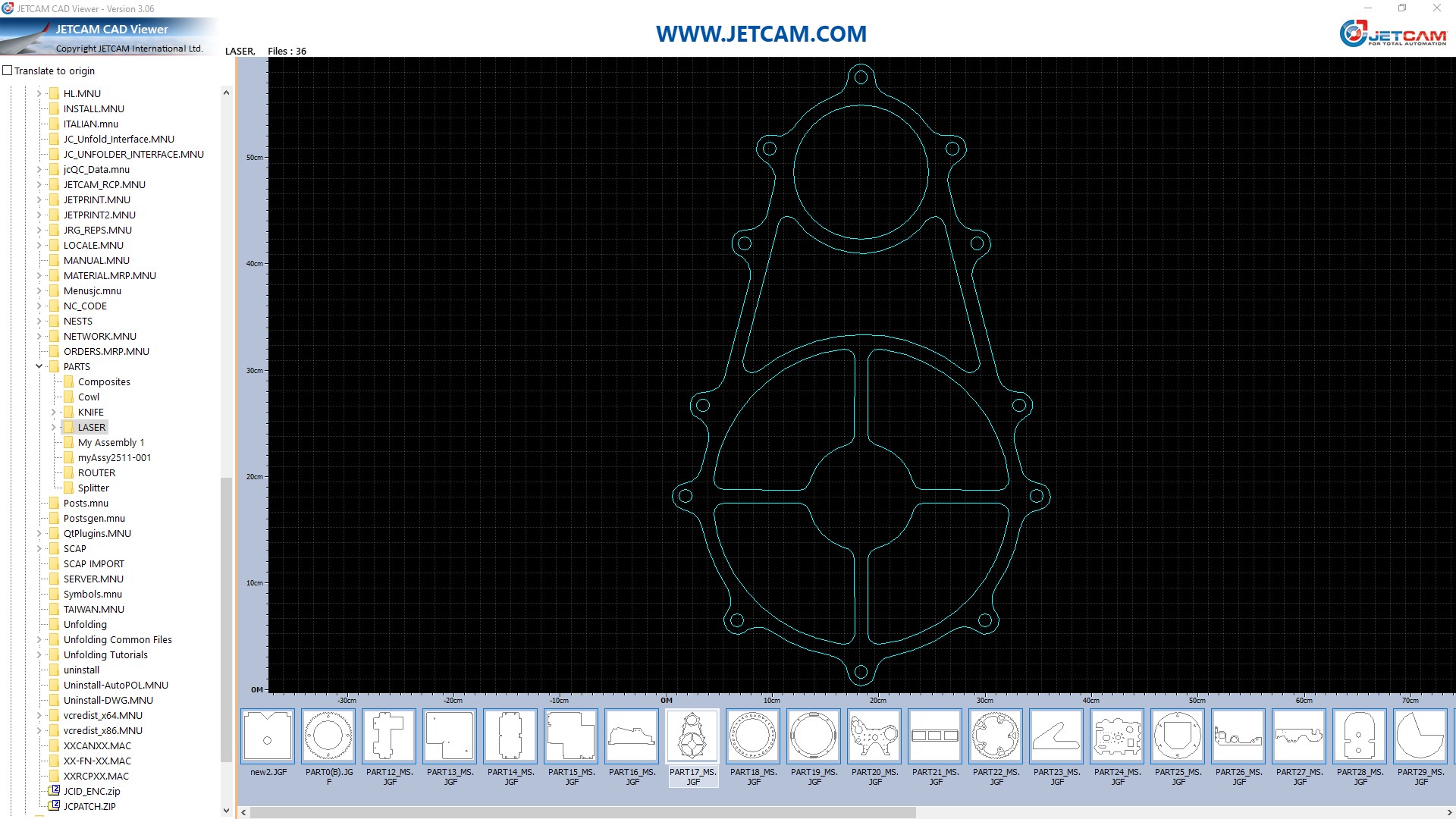
JETCAM has announced an update to its free CAD Viewer, offering users an enhanced experience with new features. The updated CAD Viewer is a free tool that allows for viewing of all major 2D CAD files on a PC.
The new release focuses on providing users with more control over their files. Key enhancements include:
Folder and File Count Display: The selected folder and the number of files within that folder are displayed at the top of the screen. This provides users with a clear overview of the directory they are working in.
Window Position and Size Memory: The CAD Viewer will remember the size and position of the window, especially if located on a screen left of the main screen. This is useful for users who often use multiple monitors or have a preferred viewing configuration.
Improved Handling of Temporary Files: If a CAD file is opened from an application such as email, which copies the file to a temporary location, the CAD Viewer will automatically copy this file to c:\temp and open it from that location. This ensures the file is accessible and prevents issues with opening files from temporary locations that are sometimes inaccessible to the user.
New Right-Click Option on Thumbnails: A new right-click option on thumbnails allows users to open the file directly in File Explorer. This enables users to perform other file management functions like opening in a different app, copying, or deleting.
The JETCAM CAD Viewer is a lightweight tool that requires less memory or hard disk space. It is designed to be installed alongside existing CAD/CAM software to provide a fast, one-click viewing of CAD files. The viewer is provided free, ‘as is’ and without warranty and can be installed on an unlimited number of computers.
Other Features of the JETCAM CAD Viewer:
No ads, spyware, or malware
No Internet connection.
Small memory footprint, approximately 40MB.
Simple tree view for local and mapped network drives.
Thumbnail images of all recognized 2D CAD files, including JETCAM JGF component files, DWG, DXF and IGES.
Can be set to be default viewer. During installation, you can choose if you want the CAD Viewer to be the default viewer for any of the supported file formats.
Measurement rules showing scale of part.
Pan and zoom with the mouse.
Martin Bailey, managing director of JETCAM, said; “The CAD Viewer is an essential install for anyone that regularly needs to view common CAD files. It installs within seconds, needs no configuration, and is extremely quick to use and navigate. This update makes it even more useful and user-friendly.”
The JETCAM CAD Viewer does not require any CAD packages to be installed to display thumbnail images. It is compatible with Windows 10 or above, and requires 52MB of hard disk space, and XGA graphics (1024×768) or above.