Category: AEC

  • What the World Needs Now is Digital Transformation

    What the World Needs Now is Digital Transformation

    Our infrastructure projects, including the construction of roads, bridges, and utilities, are significant contributors to carbon emissions. Fifty billion tons of carbon are released into the air worldwide every year. 40% of that comes from the built environment, according to KPMG. Embodied carbon, the carbon that is used to make the concrete, steel and other materials of buildings and structures, plus the carbon used in their construction, represents 22% of all carbon emissions. Unlike operational emissions, which can be reduced over time through energy efficiency measures, embodied carbon emissions are locked in once construction is completed.

    Carbon is emitted in all aspects of infrastructure, including the extraction of minerals, the manufacturing of materials, their transportation, the construction of buildings and structures, the use and maintenance, to their end of life, when building material is disposed of. Addressing carbon emissions through the full lifecycle is crucial for addressing climate change.

    “We’re not decarbonizing fast enough,” says Thomas Kiessling, CTO of Siemens Smart Infrastructure. “We have to ask ourselves: can we accelerate progress and scale up our efforts?”

    In a recent report, Digital Transformation, Sustainable Returns. The New Pathway of Infrastructure, Siemens suggests that getting to net-zero carbon emissions and meeting lower embodied carbon goals before it’s too late is only possible if those that design, build, operate and own infrastructure undergo a complete digital transformation.

    Only by integrating advanced digital technologies to enhance data utilization and improving operational efficiency can we make progress happen at speed and scale that our present situation warrants.

    Of course, this is Siemens presenting a problem for which it has a solution. Siemens has practically reinvented itself as a vendor of digital transformation applications. The company estimates the market for digital transformation market to be it estimates to be $2.5 trillion by year’s end, up 30% from last year.

    Siemens gives several examples of how its digital tools have helped to decarbonize.

    Southern Methodist University upgraded several buildings, including the central utility plant and mechanical systems and installed submeters and sensors. They integrated fire safety and security systems into platforms and installed an energy management program with fault-detection and demand flow optimization for chilled water plants. All this digitalization is estimated to save the university $9.5 million over the 1st five years.

    Norway has the highest proportion of EVs and electric heat pumps and a great variety and number of entities that both produce and consume power. This creates uneven demand and supply and often strains the existing power network. Elvia, Norway’s largest power grid operator, has created a digital twin of the country’s low voltage grid which it says has reduced outages by 30%.

    In healthcare, Switzerland’s Insel Gruppe AG also created digital twins but of a new medical center.

    “This is an important area for our industry as it is fundamental to both optimizing performance and improving sustainable operas, said says Abel Müller-Hübenthal, director of Real Estate and operation at Insel Gruppe. “We were the first in our sector to transfer data successfully from our digital twin to our operation system, and we continue to build on this.”

    Hundreds of bottles of beer on the wall. Heineken made a digital twin of a “typical” brewery. Image: Siemens.

    Heineken, one of the world’s biggest breweries, made a digital twin of a typical brewery and used it to determine energy use patterns so they could optimize thermal systems, which if implemented across the board would reduce carbon emissions by 50% and save 20% of energy cost.

    Woman about to find out why wearing shoes with spike heels in a data center is not a good idea. Seriously, data centers are big energy consumers and many more are being planned. Image: Siemens.

    Datacenters may consume 1.5% of the world’s energy today, but that will grow 5X by 2030 according to Siemens. Estonia’s Greenergy outfitted one of its data centers with thousands of sensors to monitor temperature and airflow. AI-enabled technology allows Greenergy to manage the data and control cooling in real time. This has allowed the data center to operate at a power usage effectiveness (PUE), of 1.2, down from 1.6. A PUE of 1.0 is a theoretical ideal when all of the energy supplied to a data center is used for computing and nothing else, such as cooling or Iighting.

    The report’s key findings:

    1. A little over half (55%) of the respondents think digital solutions will play a pivotal part in decarbonization but 45% do not.
    2. A little over half (54%) think their operations are data-driven, but 41% are taking baby steps or haven’t started walking.
    3. AI is seen, more than any other technology, as having the most impact on decarbonization in the next three years. Digital platforms and ecosystems were 6th.
    4. Not enough data is available. Over 40% don’t have data or can’t access it because data is not centralized. 30% lack consumption data.

    The report is based on interviews with subject matter experts and a survey of 650 senior executives from 13 countries.

  • BW Design Group Launches Strategy to Commercialization Concept

    BW Design Group Launches Strategy to Commercialization Concept

    BW Design Group, the St Louis-based AEC firm and system integrator, announced the launch of its Strategy to Commercialization concept.

    Mark Baum, over 7 years a partner of the BW Design Group for over 7 years, will be responsible for the Strategy to Commercialization platform.

    With this concept, the BW Design Group hopes to cement its position as “the only independent, fully integrated AEC firm with a Manufacturer’s Mindset.”

    If so, the company is the embodiment of a concept Autodesk has been pushing: that the AEC industry has a lot to learn from manufacturing, chiefly from manufacturers who have taken greater advantage of digital tools and processes. Whereas the manufacturing industry can’t seem to get enough technology at times, using robots on the assembly line, for example, AEC hangs back with men using hammers on the construction site. The construction industry was late to CAD. To this day, drawings still hang in construction trailers. The AEC industry has only just started on CAM, that is, if you include pre-fabrication, where parts of the building, to whole rooms, are manufactured indoors and offsite.

    “We understand the highest objective of converting capital strategies into commercialized products,” said Baum. “Aligning our unique capabilities to our clients’ evolving value chain deepens our ability to support them in realizing their most critical commercial objectives.”

    BW Design Group considers itself a natural to modernize AEC because it alone had a manufacturing parent, the Barry-Whemiller Group, who has 40 years of experience in food and beverage, life sciences, household and personal care, and industrial and advanced technology. The combination of manufacturing knowhow and AEC need has propelled BW Design into venerated lists such as ENR’s Top 100 design-build firms, Top 100 design-build firms, Top 500 design firms, Top 400 construction firms, as well as Control Engineering’s Top 10 System Integrator Giant.

    Other leadership changes were announced to support the Strategy to Commercialization concept.

    • Rob Redman, Partner and Market Sector Leader, will lead AEC for core markets, including food and beverage, life sciences and home and personal care;  
    • Mike Card, Partner and Operations Leader for Advanced Technology will lead AEC for emerging markets, including data centers, semiconductor and battery manufacturing.
    • John Bruton, Partner and Discipline Leader for Architecture, Engineering and Construction, will lead AEC operations as well as business development and project delivery for the Eastern U.S.
    • Jason Martinez, Partner, will lead business development and project delivery for AEC in the Western U.S.
    • Bruce Kuebler, Partner, will lead business development and project delivery for AEC in the Central US

  • Day 3 with Rayon

    Day 3 with Rayon

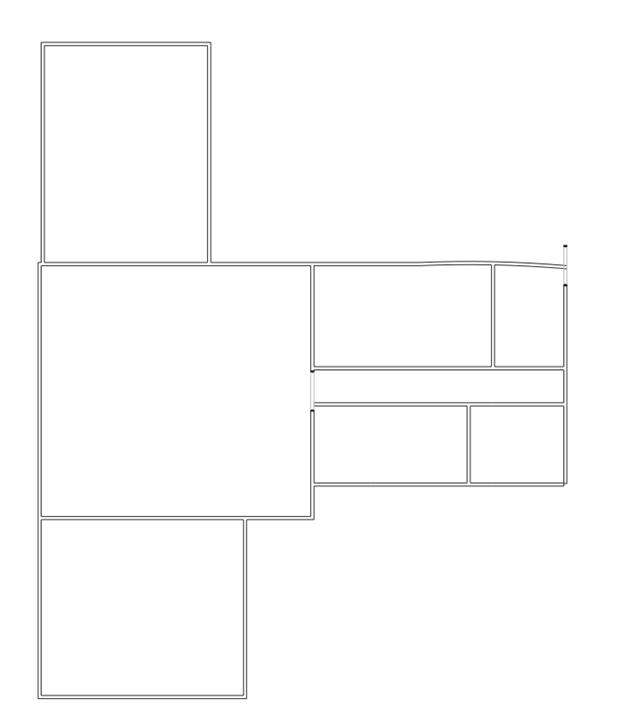
    On day 3, I am trying to add furnishings and fixtures to the floor plan I left on day 2. I am reminded of a saying: “The last 10% of the job takes 90% of the time.”

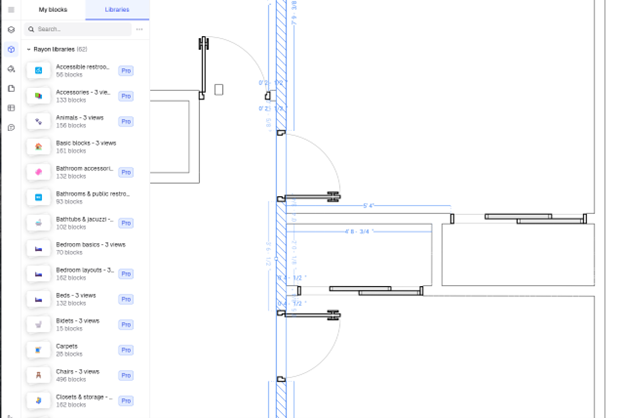
    It may look as if I was able to populate the floor plan with furniture, fixtures, and even a car — but none of it is mine. They are all generic blocks. That is all the free version of Rayon allows. In some cases, the generic block is nothing like what I have, and no amount of stretching and scaling will make it right.

    Then, there’s the language problem. Rayon’s UI may be in English but it is made in France. They have a different word for everything. Sofa does not translate, for example, because I couldn’t search for it among the blocks listed. There are no toilets, either, but urinals. Searching for blocks is like using a mental thesaurus.

    I should be ashamed for looking a gift horse in the mouth. I had to step back and think how easy it was to create the furnished floor plan. It took 3 hours. Almost no help was required. I did not have to watch a video (though if I had, I’m sure it would have taken less time). It will take days with a CAD program if all the blocks have to be made by hand. Should I pony up the €19 ($20 at today’s exchange rate) a month? It would be fun to explore the thousands of blocks that are available.

    It makes sense to have to pay for a finely crafted model of my car, for example.

    Wish list

    I wish Rayon would provide a filter so I could look through only free blocks when I search. Or at least sort the blocks so free blocks are on top.

    Simple symbols should be provided for free. I was not able to make any electrical plan because the switch and outlets were not free. Really, Rayon? Having to create a duplex electric wall outlet just kills the ease-of-use vibe.

  • Scanners Make Billion Point Models. What’s Wrong with That?

    Scanners Make Billion Point Models. What’s Wrong with That?

    Trimble’s X9 laser scanner is one of the best laser scanners in the industry. Set it up on a tripod, push the button on Trimble’s purpose-built tablet, and the scanner comes to life and starts whirring and spinning. In 2 and a half minutes or less, at a rate of over 2 million points per second, it has recorded the entire scene within 2.2 mm accuracy (at 20 meters).

    I am hearing of the X9 in a session at Dimensions 2024 titled “Seamlessly Integrating Realities. Exploring Trimbles’s Portfolio and Its Synergy with Scan Essentials in SketchUp,” expertly presented by Dr. Olivia Feng, Sr. Product Manager for SketchUp and Jeff Turgeon, Technical Product Manager of 3D Laser Scanning at Trimble.

    At the risk of being rude, how much?

    The presenters are not in sales, nor does Trimble sell directly to customers or publish their prices, leaving pricing to resellers. Still, they gamely estimate the X9 to cost around $100K.

    There were no gasps, but did I detect a stunned silence?

    Too much? Trimble also offers other scanners for as little as $40K.

    Scanning on the Rise

    Indeed, reality capture, such as 3D laser scanning and its corollary technology, photogrammetry, has become a thing of late. Dr. Feng has counted over 20 sessions devoted to scanning at this year’s event. Dimensions 2023 had less than a handful.

    Over the last 5 years or so, the ability to make a 3D model of an existing building, structure or site has progressed from a magic trick to a common sight on construction sites and in surveys. It has become a mainstay, adopted by the bigger building and construction firms. However, its entry into the mainstream has yet to come.

    “How many of you are using [Trimble’s scanning software]?” asks Turgeon. No hands go up. Are they all here due to FOMO (fear of missing out)? That might be the case. Word of laser scanning is getting around. Everyone seems to know someone who knows someone who does laser scanning.

    The high cost of laser scanning hardware would have everything to do with its lack of widespread adoption if the entry point is $40,000. An attendee asked if the scanner could be rented. Others assure him that Trimble resellers have taken to offering scanning as a service.

    Billions of Points

    If the cost barrier can be overcome, managing the output of a 3D scan presents another. We hear of the number of points being reduced by a fifth so it doesn’t bog down the hardware, which is attempting to show a grainy but colorful display of points. The colors are the result of the scanner recording a color value from a built-in camera. Were it not for the color, the points would resemble the stars seen from the Hubble telescope. Good luck identifying the constellations.

    Turgeon is understandably proud of the 78 billion-point Westminster Cathedral (Westminster, Colorado) model. The model took “a whole day to stitch together,” though auto-registration, which is available now, would have dispensed with that effort.

    Trimble scanners, able to generate as many as 2.19 million points per second, create mind-boggling large models but come at the cost of slow display, processing and confusion when visualizing.

    Each point is stored as an X, Y, and Z coordinate, plus an RGB value, plus georeferenced data; the whole set times 78 billion is too big to handle. We hear how only a fifth of the points are made visible so the display doesn’t bog down.

    The model had to have “reflections” removed and the background clipped, as long-range scanners have the annoying ability to “see” far beyond what they should be focused on, picking up objects in the far background.

    There was a minor mention of using the LiDAR built into the latest iPhones and iPads, effectively a poor man’s scanner, but no mention of its poor accuracy (2% error) and limited range. Whereas professional-grade rotating beam LiDAR units, like the X9, can accurately locate objects hundreds of meters away, Apple’s devices can barely reach a tall ceiling.

    Connect the Dots

    Seeing color helps with the visualization of point clouds, but even colored point clouds challenge the eye-brain accustomed to continuous surfaces. We are forced to connect the dots, imagining objects. Complicating matters is that every point is visible, unlike the surface or solid model, which hides geometry not visible.

    Connecting the dots may be simple in 2D, but in 3D, it requires quite a bit of effort. First of all, the point cloud must be cleaned up. There are points where there are no objects, which is the result of reflections or missing points because the laser passes through glass.

    The collection of billions of points may be a source of pride to a scanner manufacturer like Trimble, but to everyone and anyone who has to handle, manage, process and visualize, they are quite the bother.

    How should it work?

    To be continued…

  • Rayon Day 2: Doors and Windows

    Rayon Day 2: Doors and Windows

    Blocks. like these sliding doors, are a joy to work with – and behold, with Rayon.

    I resume work on the floor plan created yesterday with a bit of apprehension. My floorplan does not show up in the list of files that can be opened. I had slammed down the lid of my laptop rather hurriedly to catch a flight. The only file showing is “Test” with a blank icon. There is trace of yesterday’s floor plan. But when I open “Test,” there is my floor plan just as I had left it! I should not have been worried. Rayon, like most well-behaved cloud applications, continually saves your work. I notice a little clock icon on the top right of the screen that confirms Rayon is saving.

    I am plunging into Rayon with no instruction to prove a point: no CAD program is so easy to use that you can use it without training, instruction or at least a YouTube video series. Invariably, all so-called easy-to-use CAD programs, have failed to live up their billing if easy-to-use is defined as being able to create a simple drawing or part without any sort of help. Including. So, after only a one-minute online demo, I jumped right into Rayon. That was day 1. I expected to get bogged down. That didn’t happen. I sailed through an hour on Rayon without having to look anything up. The program was oddly and wonderfully intuitive. Walls just worked. Furthermore, Rayon was quick. It took two seconds to pull up the drawing but after that, I was never reminded the program was running on a remote server.

    But today we will find out if Rayon handles windows and doors with equal aplomb.

    But first, a little house-plan cleaning. Yesterday’s walls were placed approximately from memory in an airport lounge. Today, I have the exact dimensions on a drawing on my second screen in the office.

    Changing the wall dimensions is fairly easy with Rayon. Clicking on a wall brings up its parameters in an editable box next to the wall. You can override the number shown and the wall will update to its new length. Hower, it seems as if the wall contracts or expands from its center, which left gaps between it and the adjoining wall or made the end of the lengthened wall come out the other side of the adjoining wall. It would be nice if could sense which end of the wall is to change. That could be done by letting the pick point determine be the end of the wall to change.

    It takes a bit of trial and error and a combination of methods to get the walls more exact. Sometimes, I stretch the walls endpoints to close to the exact length and then make it exact by entering the length. I’m sure there is a better way, I just haven’t stumbled upon it yet.

    I continue to be overjoyed by how quickly Rayon reacts and how neatly it joins walls. Walls are almost always joined automatically forming neat corners. I have not had to use the Trim command once. In fact, I’m not even sure Rayon has a Trim command.

    I am using Rayon’s snap to angles. The angles snap to 45-degree increments. Most floor plans require little else.

    Getting the walls to within inches takes a half hour. I am ready to add doors. But what looks like the door is the Opening icon, which makes an opening the wall (duh) with no doors. Where were those doors with neat little handles I saw in the demo?

    For the first time, I had to look something up. The real doors and windows are in the Blocks menu. I see are thousands of blocks ready to be used. Many are only available for paying users, however. However, the more sophisticated models are available with the paid versions of Rayon which start at €19/ month. But, the basic generic doors and windows are sufficient for my purpose.

    To my delight, Rayon is smart enough to orient the door to the nearest wall and cut out the exact opening for it. The opening is dynamic so if the door moves, the opening keeps up. There’s a one in four chance the door will swing or pivot the right way but since it easy enough to correct (you can flip it vertically or horizontally, why bother trying to find out the rules or if Rayon has any.

    For sliding doors, the free blocks were a bit limited and for garage doors, there were no blocks at all, free or paid. However, I was ablet to take the wrong sized door and stretch it to fit. Rayon was surprisingly accommodating. The sliding doors contracted properly with their changed opening, keeping to the wall thickness. Had I used a Scale, I would have to have expanded along an axis, an option with other CAD commands.

    After an hour of drawing (not including this writing), the walls are within inches of where they should be, and all the doors and windows are in. I admire the drawing. The detail in the drawings and window blocks have made the floor plan look quite a bit more professional. My previous drawings, drawn with an industry leading CAD program, look like they were drawn in Amateur Hour. Because I had to create my own doors and window blocks, they had been made with the least detail. A door was a simple rectangle at 45 degrees and an arc. My Rayon drawing, on the other hand, has doors with door handles and framing.

    I am looking forward to using Rayon some more.

    To be continued…

  • A First Look at Rayon, CAD for Floor Plans

    A First Look at Rayon, CAD for Floor Plans

    Rayon promises to be a drop-dead-easy program for creating floor plans. The website is pretty slick and modern, so I bite. And within minutes, floor plans are being created, with walls being made square and straight, doors and windows just popping in, no need for trimming and cutting, all sorts of furniture is on hand…

    What’s not to like?

    From the videos, Rayon seemed like a magic trick compared to industry standards I had previously used for making floor plans, namely SketchUp and AutoCAD.

    Here was a program that was able to jump ahead of an established standard ( AutoCAD) and even what was considered to be the easiest-to-use CAD program in existence (SketchUp), and at the same time, be thoroughly modern (running on the cloud and in a browser, without the need of a download, capable of running on any device, anywhere). It seemed to be too easy.

    Was it too good to be true?

     We had to find out. Could those who need to have floor plans but do not want to either have to learn AutoCAD or pay for it have an answer with Rayon?

    The answer is nuanced.

    It’s easy enough to get started. As soon as you open an account, Rayon will be immediately available. Unless you try to use it on an iPad, as I did, believing it was device agnostic. That resulted in an odd display that was impossible to interact with. Perhaps it was a Safari problem. It led to a recursive email dialog without resolution. So we continue the story on a Windows computer, with which it was much better behaved.

    A quick floor plan was easy enough to create room by room. Once the wall command is selected, you can create rooms one by one. As you are doing so, the dimensions are displayed. You can be approximate at this point with the confidence that they can be exactly specified later, as the slick demo has promised.

    It is with joy that we see walls are added without the need for trimming, that they snap to being horizontal and vertical, and that they can infer, by selecting corners, what the endpoints need to be. In other words, a wall can line up with the opposite wall just by moving the cursor over the opposite corner.

    To be continued.

  • Trimble App Store Has Over 100 Apps

    Trimble App Store Has Over 100 Apps

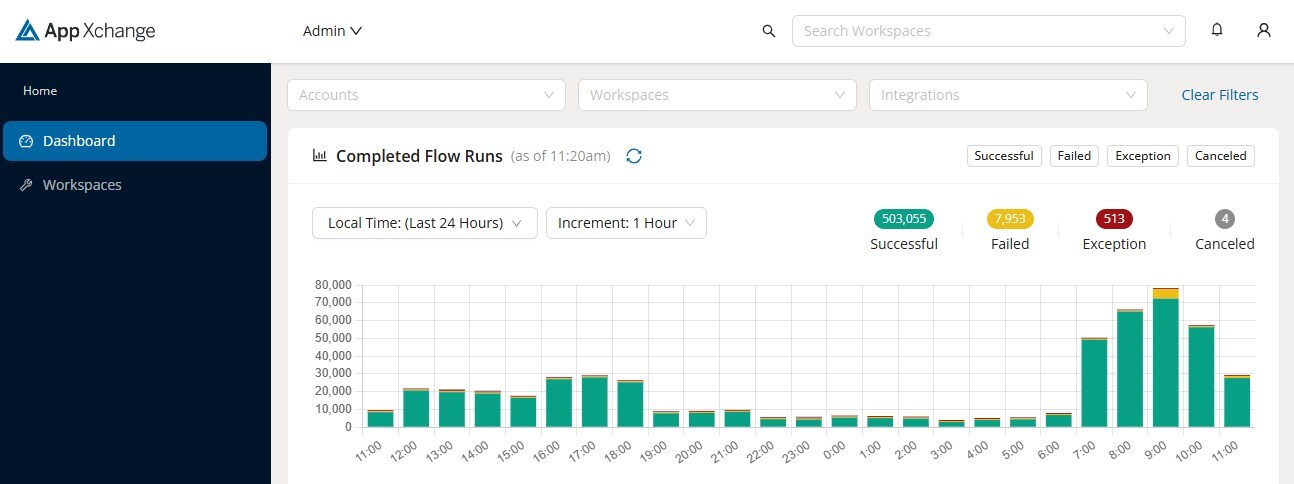
    With Trimble’s App Xchange, software developers can build integrations that can be sold as ready-to-use options for customers. In such a way, the App Xchange can also be used by construction contractors to build integrations with Trimble applications.

    Trimble has embraced the Apple App Store model with its Trimble App Xchange and it is off to a good start with over a hundred apps that tie into Trimble software. These apps enable users to link data across multiple platforms throughout various project phases.

    Trimble’s App Exchange will open another dimension to construction professionals, giving them the autonomy to set up these integrations themselves without the need for IT support or having to rely on customized solutions by developers.

    Designed for flexibility, these apps help contractors and project managers address unique project requirements, enhancing their ability to track budgets, schedules, and documentation in real-time.

    “We are committed to helping our customers achieve greater productivity and better outcomes by simplifying technology integration,” says Elwyn McLachlan, VP of Trimble’s Project and Program Management Division. “By fostering connectivity and data flow, Trimble’s latest tools aim to improve productivity and deliver smoother, more coordinated construction projects.”

    A few of what’s in store:

    TOOLTRIBE uses Implemtor to build an integration between Trimble ViewpointVista and their cloud-based app.

    “Getting data in and out of App Xchange has been very clear and straightforward,” said Kav Latiolais, software engineer at TOOLTRIBE.

    Document Crunch which claims to simplify complex construction documents, identifies project risks and streamlines critical workflows to support better project outcomes.

    ProjectMark is a construction-specific customer relationship management (CRM) system that helps contractors enhance their digital presence and improve client acquisition.

    “Having all Trimble integrations in one place makes it easy for contractors to pick and choose the solutions that best fit their specific needs — whether they be financial or project-related,” said Peppler. “It also helps make the construction industry more approachable to technology startups by providing entrepreneurs an easy way to interconnect their solution with others, driving up the value to contractors who are explicitly looking to make their businesses more efficient and profitable.”

    App Xchange is available as part of Trimble Construction One, a connected suite of software solutions that automates workflows and synchronizes data so that contractors can more easily design, build and maintain their projects.

  • Trimble Makes ProjectSight Free

    Trimble Makes ProjectSight Free

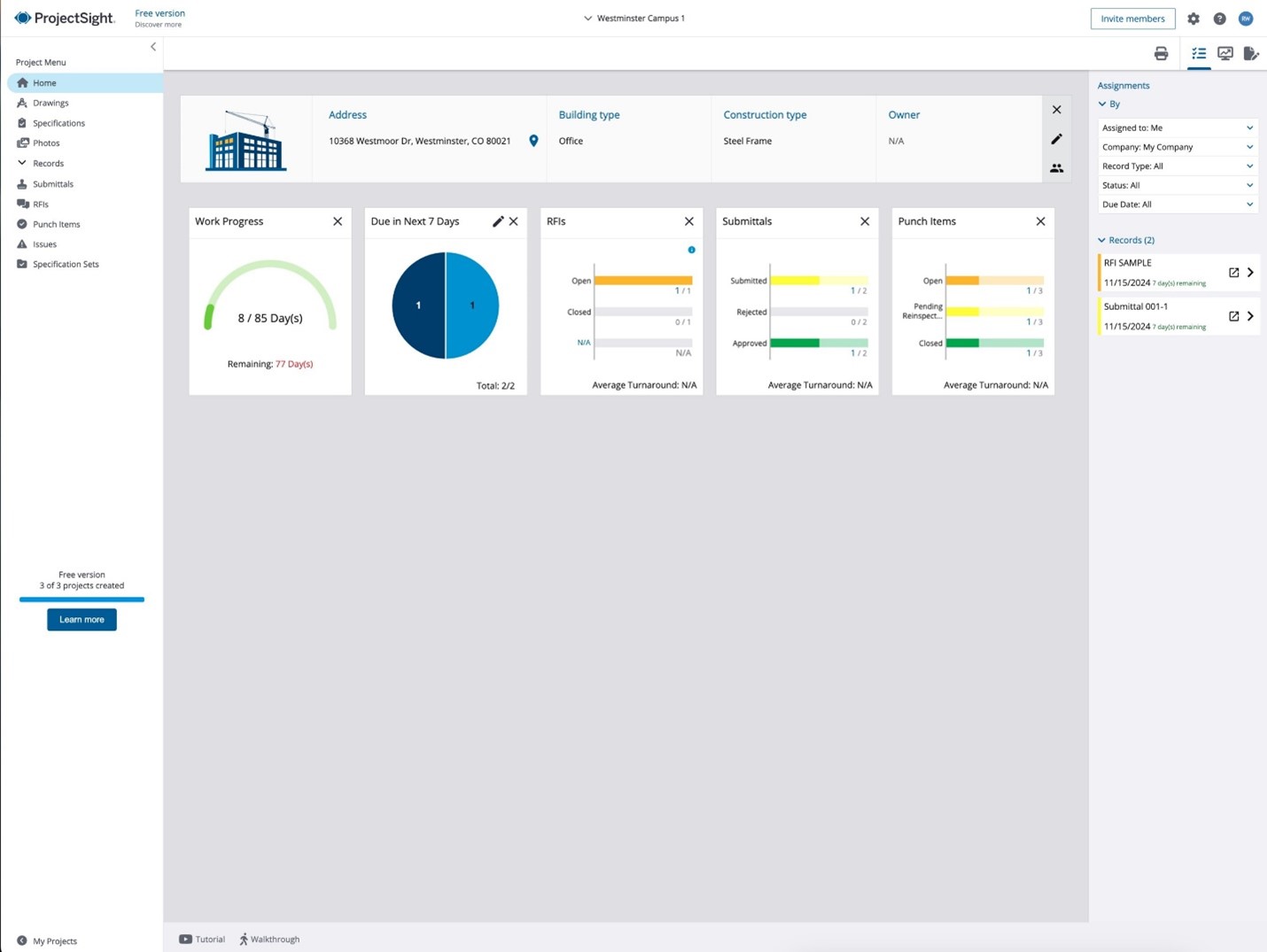
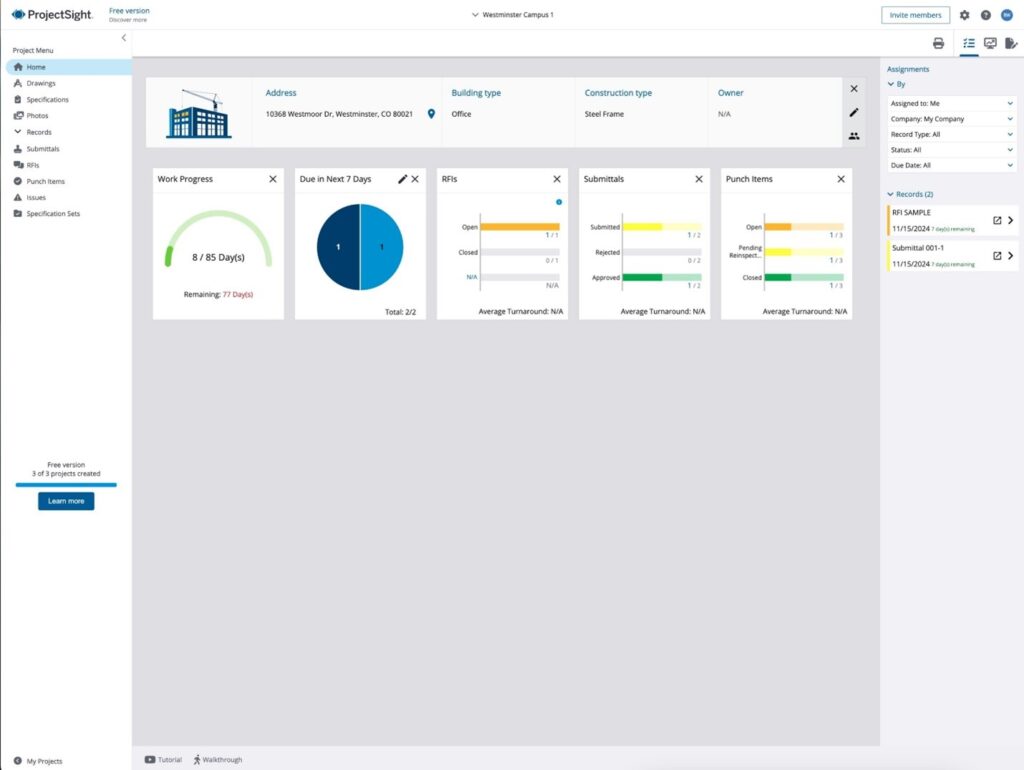
    Trimble has launched a free version of ProjectSight, its project management software for the construction sector, aiming to increase the adoption of digital tools in an industry notorious for being slow to adopt them. Making software free removes one, though not all of the barriers to adoption.

    ProjectSight enables contractors to manage tasks like document control, budgeting, and managing communication between the office and the field with a centralized platform. It ought to improve project efficiency and coordination, reduce miscommunication, and streamline workflows. While large firms have big budgets and are early adopters, getting it into the hands of those in small and midsize firms has proven to be a challenge,

    The free version includes a new AI-powered feature that automates document tracking and management by recognizing drawing numbers, versions and other text content.   “A no-cost version of ProjectSight removes barriers to entry and presents a simple way to experience the project management benefits,” says Jon Fingland, vice president and general manager for Trimble construction software solutions. “Some contractors have viewed powerful construction management tools like ProjectSight as too expensive or complicated.”

    The free version of Trimble ProjectSight provides a centralized environment to manage and share drawings, photos, specifications, submittals, punch lists and RFIs for up to 3 projects and includes 3 GB of storage. The next level is called “Go” and has an unlimited number of projects and 15GB of storage. No price has been set for Go.

    Trimble launched ProjectSight in 2014 and was selling it for $15 a month, discounted to $120 a year.

  • Trimble Shows AI Tools at Annual User Meeting

    Trimble Shows AI Tools at Annual User Meeting

    Several AI-based tools are on display at Trimble Dimensions, the company’s annual user meeting and conference.

    SketchUp Diffusion: A generative AI-powered tool introduced by SketchUp Labs at last year’s Dimensions conference is being well received this year. One reason is that Dimensions now includes 3D Base Camp, the once-standalone SketchUp user meeting. SketchUp puts rendering, which used to have to be done with 3rd-party applications by experts, in the hands of everyday users. Diffusion is still in the Lab, so still a work in progress, but definitely worth a look.

    ProjectSight, Trimble’s project management application, now has an AI-driven import feature that automatically extracts critical information from drawings and documents.

    Trimble LiveCount, which counts mechanical, electrical and plumbing components for the purpose of bidding, is now equipped with AI to detect and count symbols on construction drawings automatically. This feature, especially beneficial for electrical contractors, saves time by automating the counting of receptacles, switches, and other common electrical items in takeoff processes. Live Count is available with Accubid subscriptions.

    Trimble Business Center, a “field to finish” survey CAD program, now integrates AI for point cloud data processing, able to detect and quantify objects on a site, such as volumes of stockpiles, features and conditions of roads.

  • What’s Up, Docs?

    What’s Up, Docs?

    Forma Board is integrated with Docs, where all Autodesk files will eventually be atomized. Relax. There may be little downside and a bunch of benefits. Image: Autodesk.

    At AU2024, Autodesk announced that Forma, the AEC generative design app, was “connected” to Docs, allowing Forma Board to get visuals from Docs without having to have Forma. Forma Board is like PowerPoint and a view/markup app had a baby. You still need Forma to create the content, but with Forma Board, anyone can view and markup the content. It’s the much-copied Adobe Creator/Viewer model: pay to create, view for free.

    A Review of Files vs Databases

    With Docs getting so much attention, let’s review what it is, what it does and what it allows you to do that could not be done before.

    Since there has been CAD, there have been CAD files. For AutoCAD, there were DWG files. Inventor also had a proprietary file format, as did Revit. Other vendors, SOLIDWORKS, Creo, NX and CATIA… all did, as well.

    Then came this upstart, Onshape, which, instead of files, kept a database on the cloud – and because of that setup, they were able to do strange and wondrous things, like collaborate and version and the Holy Grail, the single source of truth. Okay, fine, whatever, said most CAD users. This strange cloud-based CAD program would not change how they were going to go about their business.

    But while most of us were not paying attention to the back-room database vs. file debate, Autodesk was. And, without much of an announcement, Autodesk decided to favor a database approach. Perhaps they did not want to admit Onshape had the right idea all along.

    At Autodesk’s annual user meeting, Autodesk University 2024, we were to find out just how seriously they were about going full database – instead of files.

    The disadvantage of starting from a user base of zero was also its advantage. It afforded the startup the luxury of being able to change everything. An established CAD vendor cannot do that. It’s the old good news, bad news joke that is often told about Autodesk.

    The good news: AutoCAD has a lot of users.

    The bad news: Autodesk has a lot of users.

    Get it? A large user base discourages innovation. A user base of millions is a million votes for preserving the status quo. For them, innovation is disruption.

    Blowing Up Files

    Autodesk wants to blow up our files. That might not be so bad.

    With so much of the talk from the stage about data and the advantages of “granularity,” we had to ask what this meant for the CAD user and their files.

    Answer from Autodesk: If we do this right, the user will never notice. The hard work is all on us.

    Apparently, “doing it right” involves a lot of work for Autodesk. The organism that is the file is no more than a collection of cells. It is a total of the graphics and data of a CAD model. It can be broken down into its cells, stored in the cloud, and rebuilt in the same file – or, if the need arises, another file.

    This collection of cells is what Autodesk confusingly calls Docs. We had previously associated “docs” with Microsoft Word files. “File” is the very opposite of “database”  in this story, but let us finish.

    Autodesk Docs is what Autodesk calls a “common data environment” for all in the AEC industry plus owners. The plan is for all Autodesk applications, including AutoCAD, Autodesk Construction Cloud, Revit, Tandem, Civil 3D, and Autodesk Workshop XR, to have their databases in Docs. Some are already there; the rest will follow.

    Autodesk is not abruptly ending the use of files. The plan is that as long as file-based CAD programs exist, so will files. However, on the cloud (in Docs, in this case), there will be a parallel universe with the same drawings and models in databases, in other words, the database equivalent of the file. It will update automatically – any change in the file, say, caused by the Revit user, and the database in Docs will update automatically.

    One advantage of the database, the cloud-based copy of the file, is that it can be accessed by those who would not be able to access the file. In the case of the Revit BIM model, these would be stakeholders, like owners, who have no access to Revit.

    Like users of other CAD programs? Would Autodesk tolerate Bentley or Graphisoft users being able to access Revit databases, for example? There was no mention of different CAD programs expressly, but Autodesk has conceded more openness lately.

    However, several Revit users could access the same database, even simultaneously. Such real-time collaboration by multiple teams and interests is vital for complex projects involving several disciplines and trades. HVAC guys, piping, structural steel, etc., all accessing one database, a single source of truth…

    Sounds like heaven, right? But there is the devil in the details.

    Autodesk University 2024 was all about selling the deconstruction of files into databases, and the most used word for the event was “data.”  By the middle of day 1, “data” had knocked “AI” off the top of the podium by our rough count. By the end of day 2, it was no contest. Data was raining down on us.

    Hurricane Data had touched down in San Diego.